Your project is its knowledge
Why KaKeKiKoKu Studio no longer calls itself a memory layer — and what that brings in 1.18.
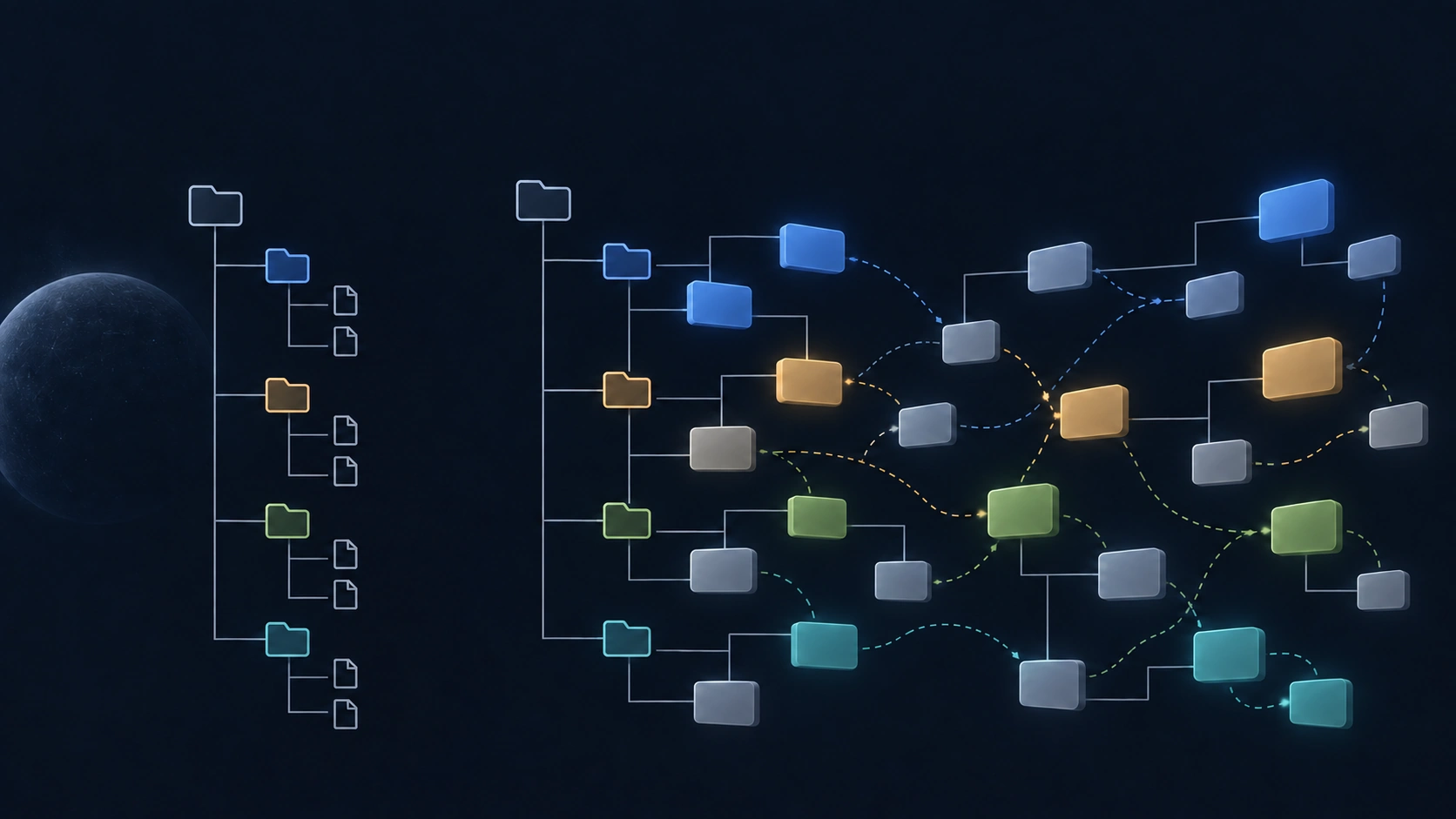
With the name change nearly complete, and before starting to talk more widely about KaKeKiKoKu, I took a few days to reflect on a simple question: what is this product, really? Not which feature to add next, but what it is.
The answer led me to change how I explain it.
What I have been saying
For months I have introduced KaKeKiKoKu Studio as “the memory layer your AI is missing.” It made sense when I started. AIs forgot everything between sessions, context windows were small, and any decision was lost as soon as the conversation ended. A good part of the design was born to make up for those gaps.
But AIs have changed enormously in a year. They reason better, hold more context, and more and more tools now include their own memory. I think that is good news. It also forces an honest question: if a product is defined by making up for what AI lacks, what happens as AI lacks less and less?
What does not shrink
The answer was on the home page from the start: knowledge is the project; the result is a byproduct.
When you create something with AI — software, a novel, a thesis, a business plan — what you are really building are decisions, constraints, intentions, and discarded alternatives. The code, the chapters, and the documents are the form that knowledge takes.
And one thing does not change, however much the models improve: that knowledge is yours. It does not belong to a conversation, to a provider, or to whichever tool you use this month. The more AI produces, the more knowledge there is to govern, and the more it matters that it has a place of its own.
The person creates. The AI brings intelligence and execution. KaKeKiKoKu Studio is where you both shape that knowledge: in blocks with identity, connected, and kept true to your files as they change.
What changes now
The words change, because the perspective changes. KaKeKiKoKu Studio now presents itself as a knowledge system for your projects, not as memory for your AI. Persistent memory is still there; it is one of its capabilities, not its reason to exist.
It also stops speaking mainly to people who write code. It has always worked for any project with knowledge worth keeping; now it says so from the first line.
You can see it on this website and in the roadmap. With 1.18, it also reaches the help that AIs receive when they connect, and the application’s welcome screen.
New in 1.18: a tree of knowledge
A knowledge system should be something you can walk through. Until now, the navigation tree showed the structure of your folders and files, which is already one kind of relation: what contains what. But knowledge crosses that structure — a decision shapes several files, a rule applies in more than one place.
With 1.18, the tree shows both. Under each resource, and under each of its blocks, you now see its relations: first the ones that reach it, then the ones it declares. Each one looks like any other item in the tree — the icon of the resource at the other end, its name, and the description of the link — with a small arrow that tells you which way it points.
A relation in the tree is a shortcut, not a copy. Click it, or press Enter, and you land on the real resource and block. The tree only ever shows one level of relations, so even when two ideas point at each other you can follow the loop as far as you like, one step at a time, without the tree growing out of control.
This is the paradigm shift I was hoping for in how the product evolves: from exploring files to exploring knowledge.
And the integrations
In earlier posts I wrote about integrations with Visual Studio Code and OpenCode. I have not dropped them: they are still on the roadmap, just further back. First, I want the knowledge system itself to take this step.
Update (October 11, 2026): The Visual Studio Code integration is no longer planned. KaKeKiKoKu Studio is built for AI coding agents, and the ones you can use inside VS Code, such as Claude Code and Codex, already connect to it. OpenCode stays on the roadmap.
One small extra
Working with AI also means waiting now and then, while it finishes a long task. For those minutes, 1.18 adds an Extras menu, after Help, for things that are not part of the knowledge system. The first one is a free game, Blocks: fit blocks on a board and clear rows and columns, calmly in Classic mode or against the clock in Rush.
It pauses on its own as soon as you switch windows, so the AI’s answer always comes first. It is a pastime for those waits, not a way to spend your working day: please play responsibly. And it lives apart from the knowledge system; nothing in the core depends on it.
A fix for your AI
Building the new tree also brought a bug to light. When your AI asked which resources refer to another one, the answer left out the relations declared at the root of the project, even though the application showed them. 1.18 fixes it: your AI now sees the same relations you do.
What does not change
The application is the same. It runs locally, with no accounts and no telemetry. The core remains free. The format is the same, and your projects do not need any change. And it keeps working with the AI you choose: there are many AI environments today, and none of them should end up owning your project’s knowledge.
These days of reflection did not give me a new product. They gave me the sentence that should have been on the home page from the beginning: your project is its knowledge.