Wuniq is growing into KaKeKiKoKu — a broader software family built around one idea: complex things become clearer and stronger when their parts have structure, identity, and room to connect.You may see both names during the transition. Read why →
Now in Beta — see what’s new on the blog

The memory layer
your AI is missing.

Built for people who already live with AI in their workflow — by design.

KaKeKiKoKu Studio gives your AI persistent, structured project knowledge: living beside your files, synced as they change, shared across sessions and AI clients.

100% local No accounts No telemetry Free core
Studio
New in 1.17 · Easier to get started

One-minute setup.
One simple text file.

Getting started with KaKeKiKoKu Studio is now easier. Save our ready-made instructions as AGENTS.md, CLAUDE.md, or your editor’s equivalent. Open Studio and start a conversation with your AI. No MCP configuration required.

Get the instructions →

Already have an instruction file? Add our instructions to it. The minute refers to this initial setup, with Studio and your AI client already installed. Keep Studio running; your AI needs local HTTP tools and permission to use them. MCP remains available.

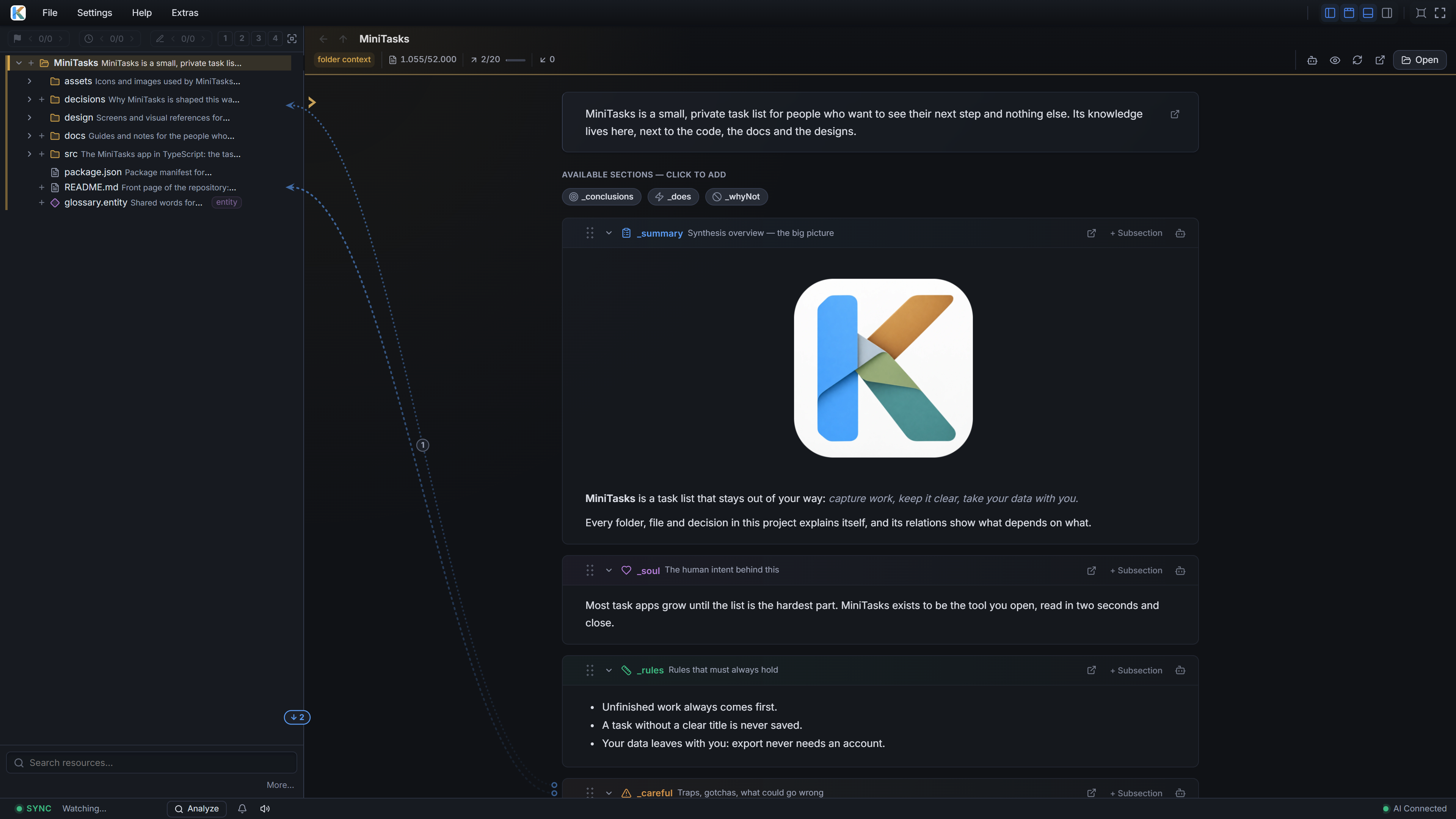
The KaKeKiKoKu app — workspace

KaKeKiKoKu Studio showing the English Learning Lab project tree, structured knowledge, a Markdown table and visual relations
The Missing Layer

Give project knowledge
a place of its own.

Instructions, client memory, skills, and KaKeKiKoKu can complement each other. Choose where each kind of knowledge belongs.

CLAUDE.md / AGENTS.md

Working instructions

  • Lives In your repo — good start.
  • Updates By you or an AI maintaining the instructions.
  • When the project changes Review depends on your workflow; scope and loading depend on the client.

Built-in AI memory

Memory managed by your client

  • Lives In storage chosen by the client.
  • Updates Through the client or AI, with review controls that vary.
  • When the project changes Check how your client retrieves, updates, and exports project memories.

Skills

Reusable procedures

  • Lives In a user or project skill folder.
  • Updates When you update the skill.
  • When the project changes Review the procedure when its assumptions change; it can consult project knowledge.

KaKeKiKoKu Studio

The project’s own memory

  • Lives Beside your files, in the repo, structured in bounded blocks.
  • Updates You and your AI maintain it; KaKeKiKoKu watches for drift.
  • When the project changes Review drift in the panel or receive AI notifications through supported channels.

KaKeKiKoKu brings resource context, relations, selective reading, and sync checks together in a local application.

Read the full, honest comparison — Obsidian vaults included →

Knowledge is the project.
The result is a byproduct.

This is the new paradigm for working with AI. You build in cycles — work, review, refine, accumulate. Each cycle generates knowledge: decisions, constraints, intention. That knowledge is what you’re really building.

Without it persisting, the cycle resets every session. Your AI forgets. Your review has no context. Nothing accumulates.

Forgetting also has a price tag. Resume a long conversation days later and your AI re-reads its entire past at full cost — the provider caches that made it cheap expire minutes after you leave. A fresh session with KaKeKiKoKu loads the map and only the knowledge it needs: continuity for a fraction of the tokens.

And it scales with you: work across many projects at once — code, content, research — and pick the exact slice the AI sees each session. You conduct the context. The AI executes.

That’s what a knowledge engine does. That’s what KaKeKiKoKu Studio is.

Continuity, by design The session ends.
The knowledge stays.
Different conversations.
One accumulating body of knowledge.
  1. Session 01 Decide

    Choose the direction.

    Agree that the project keeps its data local.

    A decision takes shape
    The AI records the decision
    Project memory
    • Keep data local
  2. Session 02 Build

    Start with the why.

    Use that decision to build the storage layer.

    Reads the previous decision
    The AI adds a rule
    Knowledge accumulates
    • Keep data local
    • No external requests
  3. Session 03 Refine

    Continue with context.

    Improve the implementation within its constraints.

    Reads the decision and the rule
    The AI updates the file context
    Ready for the next session
    • Keep data local
    • No external requests
    • storage.py · implementation
The Loop

Your AI edits the project.
KaKeKiKoKu keeps the memory in sync.

You work with the AI in your normal client and supervise the project in KaKeKiKoKu. The AI changes real files. KaKeKiKoKu watches those changes, detects when knowledge drifts, and shows you exactly what context exists, what is missing, and what needs attention.

The AI changes real files

Code, documents, chapters, research, plans. The output lives in your project, not inside KaKeKiKoKu.

KaKeKiKoKu detects what changed

File changes, missing context, stale knowledge, broken references, pending documentation.

The AI updates memory

Decisions, rules, traps, rejected alternatives, summaries, relations. Structured for future sessions.

You supervise the state

See what the AI knows, what drifted, what is missing, and where the project needs attention.

The web UI is the control room. The engine is the loop between project files, AI work, and structured knowledge.

One tool. Several engines.

KaKeKiKoKu looks simple from the outside. Under the hood, several engines cooperate to keep project and memory aligned.

KnowledgeSidecars, entities, sections — memory in bounded blocks.
RelationsExplicit connections between blocks. A navigable graph.
SyncReal-time drift detection between files and their context.
StatesComplete, orphan, ghost, drift — the project shows its health.
Auto-repairsSafe cases with one obvious fix get fixed without ceremony.
Live indexThe resource map your AI receives on open.
HTTP + MCPOne instruction file to start. MCP when you want it.
Web UIThe human control room: see, edit, relate, validate.

And it runs inside the editor
you already use.

KaKeKiKoKu is a local web app, so an AI client with a built-in browser pane can show it right beside the chat. One screen, no window switching — and you watch the indicator light up as your AI reads and writes your knowledge. In a separate window you never catch it, because you are looking at the chat.

KaKeKiKoKu Studio inside Claude Desktop Code, with a conversation beside the Learning Lab decision table and visual relations

KaKeKiKoKu inside Claude Desktop Code

KaKeKiKoKu Studio inside ChatGPT (Codex), showing the Learning Lab decision table and visual relations in the built-in browser

KaKeKiKoKu inside ChatGPT (Codex)

Setup is one paste — each integration guide carries a prompt you hand to your AI.

KaKeKiKoKu is free to download.

Runs entirely on your machine. No accounts, no telemetry, no ads, no spam.

Natively available in English, Spanish, German, French, Italian, and Portuguese.

The Problem

AIs are extraordinary at solving what you ask. But they have fundamental workflow problems most tools still treat as prompt issues.

A metaphor for the traditional software workflow: the software moves forward, while its documentation stays scattered and falls behind. With AI, context matters as much as the software itself.

Three separate archives with interrupted copper connections and loose pages between them
Lost decisionsUnreported issuesOutdated context

Your AI destroys knowledge while it works.

When you talk to your AI, the conversation is full of decisions, constraints, nuances, discarded alternatives. But the AI does not see them as knowledge — it sees them as input to generate its answer. Once it resolves your request, the intermediate reasoning disappears. The result stays, the why does not.

The context window is finite. As the conversation grows, older parts get compressed or lost. Between sessions, your provider may offer summaries or memory — but those are approximations, not real knowledge. The result: every session you start worse than you finished. You repeat context. You repeat decisions. You repeat mistakes you already solved.

You can mitigate this by writing context documents yourself, or asking your AI to generate them. But that costs time, and handcrafted docs are all-or-nothing: either the AI gets the full text burning tokens, or it gets nothing.

Your AI dodges problems that aren’t its goal.

AIs are trained to resolve your request. That is literally their optimization function. When they find a secondary problem — a bug, an inconsistency, a design flaw — they evaluate it against their primary objective. If it does not block them, they marginalize it.

This is not a defect. It is design. The AI prioritizes completing what you asked for. Real problems appear buried in hundreds of lines of output. It mentions them in passing and moves on. You do not read them — you treat AI output like a compiler. You check the beginning and the end.

You change your project and knowledge falls behind.

This is the oldest pain in any project. You move forward — code, refactor, fix, iterate — and the documentation rots. You know it should be updated. You will do it later. Later never comes.

With AI it is worse. Your AI generates changes faster than any human can document. So you create a master document — a single file with all the context. It works for a day. Then reality moves on, the document falls behind, and now you have something worse than no documentation: documentation that lies. Your AI reads it, trusts it, and makes decisions based on yesterday’s truth.

Fragments of project architecture organized as reusable knowledge

KaKeKiKoKu™ solves these problems.

3 problems. 1 tool. 0 cost for the core.

The Solution

Your AI starts oriented, not lost.

Open a project and your AI receives the full knowledge map in one operation: every file and folder with its description, rules, and current state. Important resources come first.

It doesn’t swallow the whole project. It gets the map, then drills into specific resources on demand — the right level of depth at the right time, at minimal token cost.

See your project think.

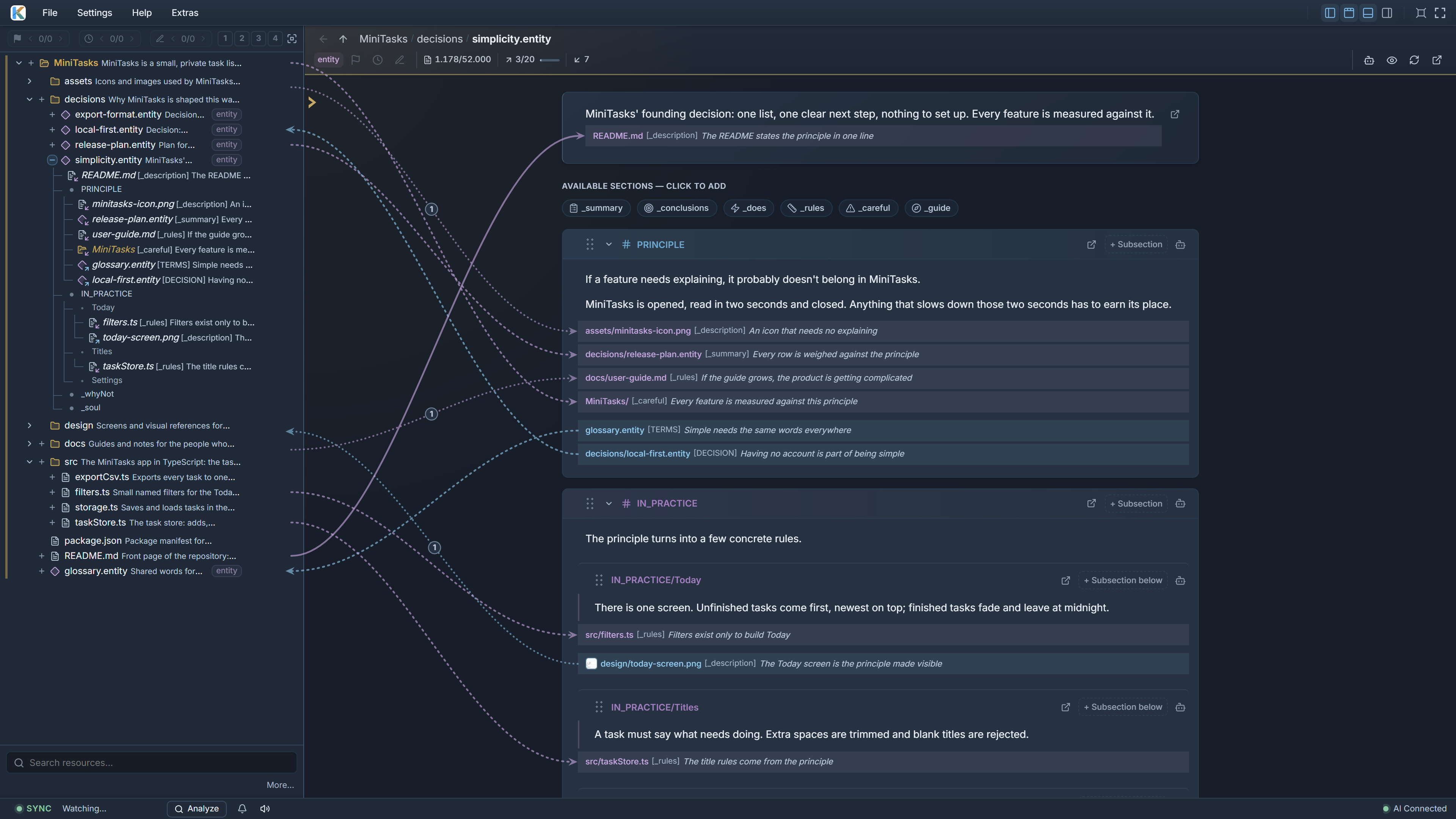
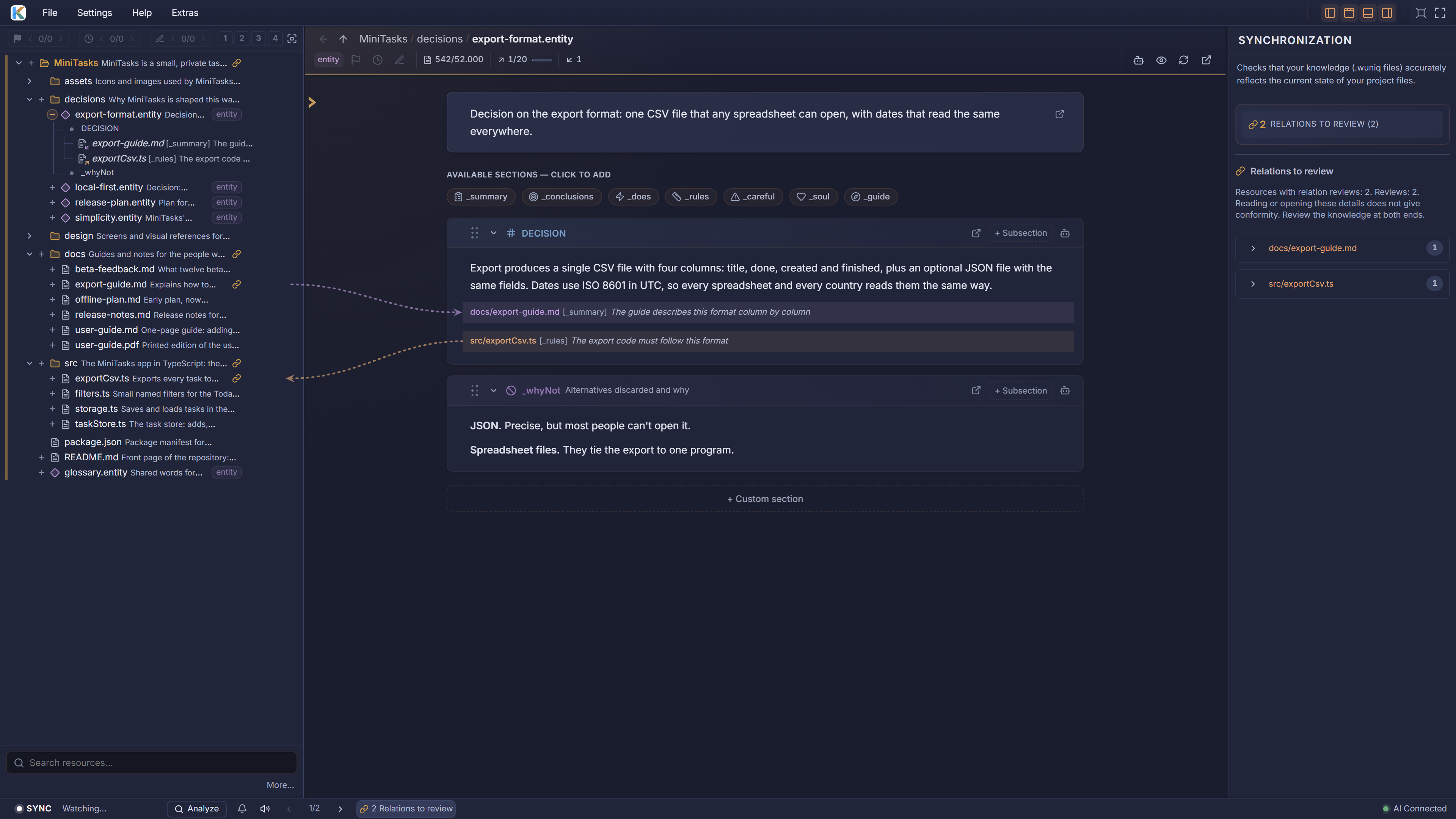
Relations in KaKeKiKoKu don’t point at words — they point at blocks with identity: a section, a file, a decision. Draw them by dragging one block onto another; follow them as arrows across the panels.

Switch to the project map and the whole knowledge graph becomes visible: what connects to what, and why. It’s the same map your AI navigates — now in front of you.

The map first. Then the meaning.A relation connects identified blocks.

01 Get oriented

See the structure before opening the detail.

Project mapStructure · descriptions · state
  • Productroadmap.mdresearch.md
  • Datastorage.pyschema.json
  • Interfacedashboard.tsxtheme.css
The taskImprove local storageFollow the connected knowledge

02 Follow the relevant route

  1. ProjectThe living index

    What exists, where it lives, what matters.

    orients the AI
  2. DecisionKeep data local

    The reason behind a design choice.

    sets a constraint
  3. RuleNo external requests

    The boundary that the work must respect.

    applies to a file
  4. Filestorage.py

    The real resource, with its own context.

    read with understanding

03 Read the blocks you need

The decision, the rule, and the file context — ready for this task.

DecisionRuleFile context

An illustrative path through project knowledge.

Decisions no longer get lost.

While the AI works, KaKeKiKoKu guides it to capture what matters: why it was done this way, what was rejected, what must not break. Knowledge lives in the project, not in a conversation that disappears.

Design decisions land in _soul. Rejected alternatives in _whyNot. Invariants in _rules, traps in _careful. Next session — same AI or a different one — the reasoning is right there.

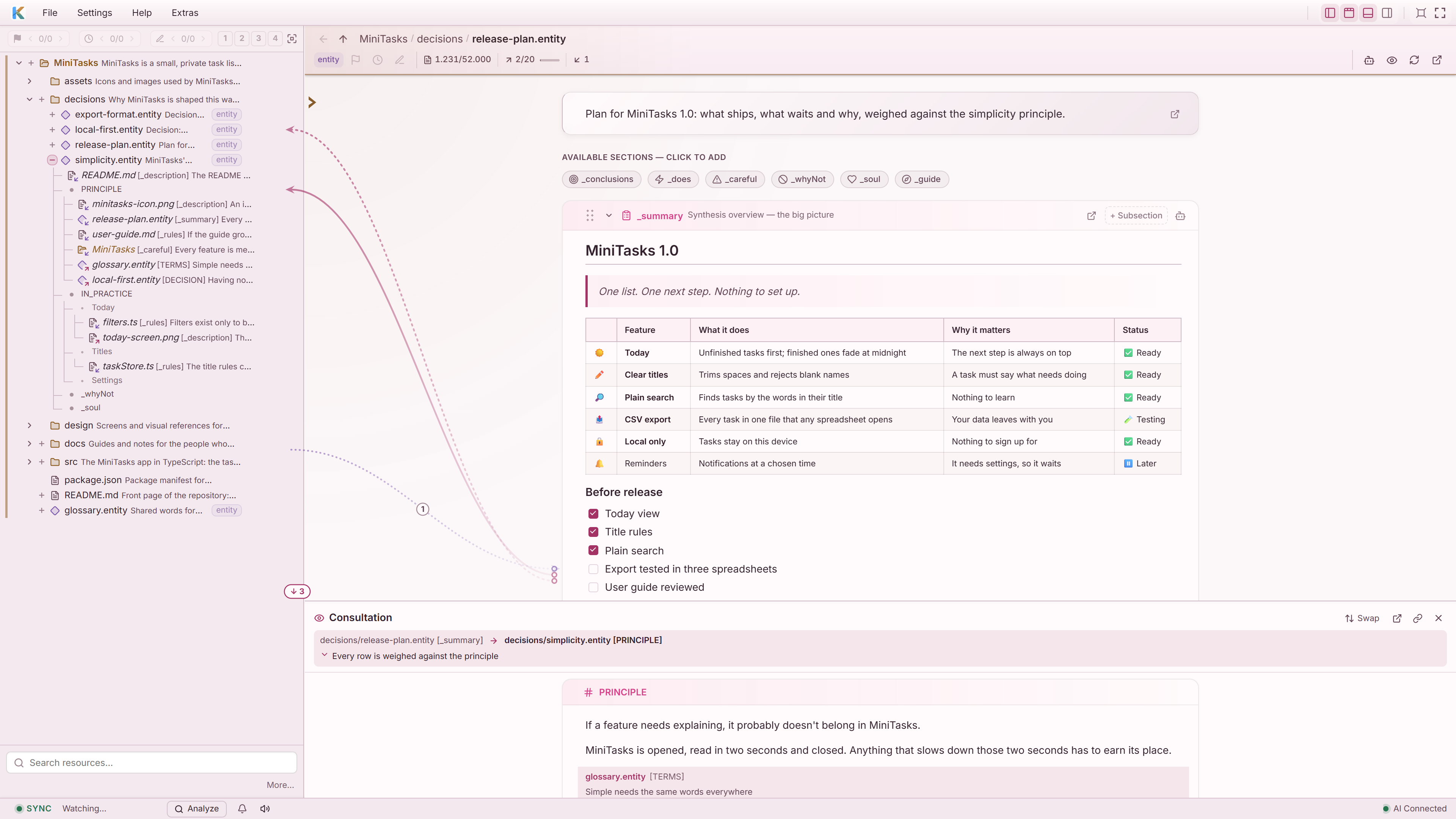
KaKeKiKoKu Studio in a light theme, rendering a Markdown table of project knowledge engines with a heading and a highlighted quotation

Your AI reports what it finds.

KaKeKiKoKu makes the AI stop and report the problems it noticed while working — instead of burying them in output.

Ghost knowledge, orphan files, broken references, drift between files and their context. Every issue lands in the sync panel with a one-click fix. Fix everything at once or pick one by one; your AI handles the rest.

Knowledge that keeps up with your project.

KaKeKiKoKu watches your project in real time. When files and knowledge diverge, it detects the drift and puts your AI to work on it. The oldest documentation pain, solved.

It waits for silence, runs a background analysis, and notifies the AI when something needs updating. Live counters in the status bar show the health of your project at a glance.

Files change. Meaning stays connected.
  1. 01
    The file changes

    The project moves forward.

  2. 02
    Sync detects drift

    A difference becomes visible.

  3. 03
    The AI revisits the context

    The knowledge catches up.

  4. 04
    You review the state

    Human judgment closes the loop.

The next session starts from here.

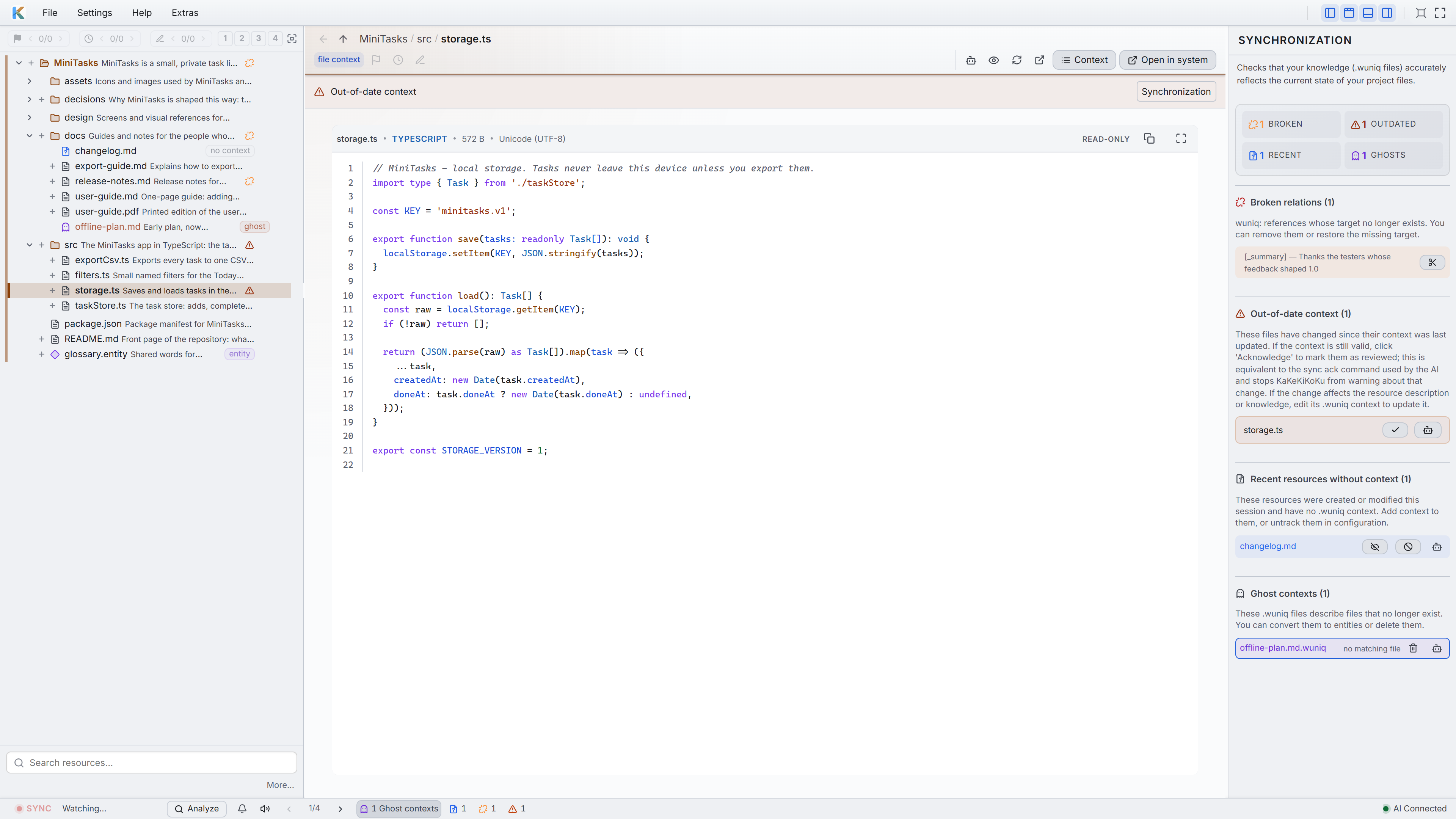
KaKeKiKoKu Studio showing the MiniTasks project, a Markdown table and visual relations, with outdated documentation, an undocumented file and orphan context flagged in the Synchronization panel on the right
On the right, the SYNCHRONIZATION panel shows KaKeKiKoKu working its magic. Outdated documents and lost context no longer go unnoticed — they become visible issues, ready to resolve.

Find it, read it, fix it — right there.

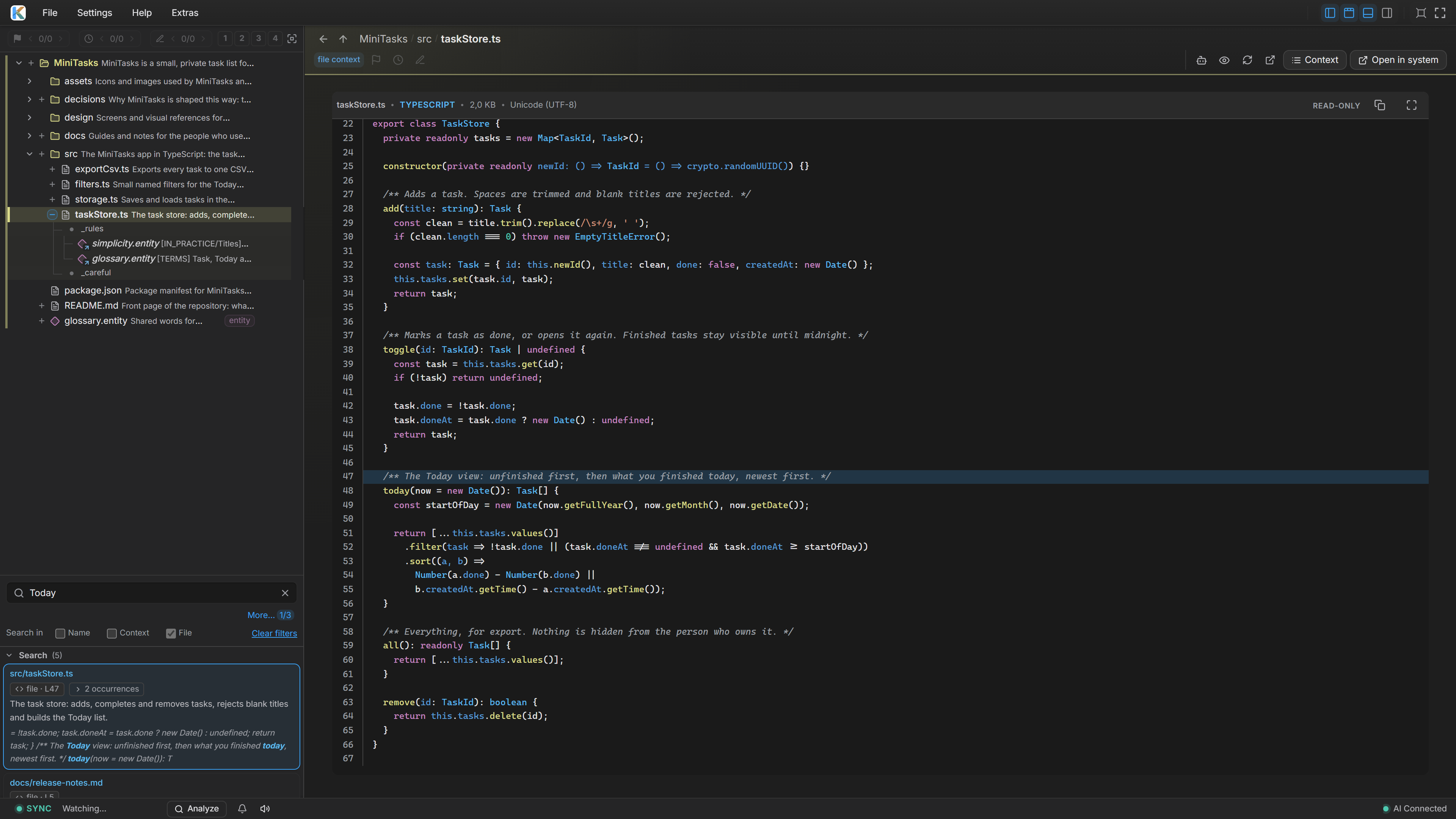
Search shows where every match lives — in the knowledge, in the file content, or in a name — and jumps exactly there: the section, the line. No detours.

Quick viewers open your code and documents (.docx, .odt, .pdf) without leaving KaKeKiKoKu. A block-level Markdown editor with a formatting ribbon edits knowledge in place — and whole blocks of knowledge can be moved between resources by dragging them.

KaKeKiKoKu Studio displaying the original JavaScript source file with syntax highlighting and line numbers in its read-only code viewer

Knowledge that works beyond the AI.

KaKeKiKoKu doesn’t just capture knowledge — it turns it into output. Export everything to standard Markdown with one click. Generate reports built from your project’s real-time state, then enrich them with AI that has both the report and the full project context.

Your data is always yours. No lock-in, no proprietary formats — the knowledge format is plain text and publicly documented. The reports are a starting point; you decide what to ask next.

KaKeKiKoKu generates → AI enriches → You decide

Full Export Standard Markdown — zero lock-in
Executive Summary + AI High-level overview for stakeholders
Pending & Drafts + AI What’s incomplete — you set the priorities
Design Principle

Limits are not walls.
They are the shape.

KaKeKiKoKu works because knowledge does not live in endless documents. It lives in bounded blocks with identity: sections, sidecars, entities, images, and relations. Each block can be read, linked, updated, and understood without swallowing the whole project.

At first, the caps look like a restriction. Then they become a signal. If an idea does not fit inside its block, the idea is probably hiding two ideas. Split it, and the AI reasons more clearly.

Relations follow the same rule. They don’t link words in a document — they link blocks. That is why an AI can follow them without guessing, and why a KaKeKiKoKu project reads like a map instead of a pile of text.

The block is not the limit. It is what lets the thing grow.

KaKeKiKoKu is not just an app. It is a way of working — and the blocks are its grammar.

Read the bounded blocks manifesto
Isometric bounded knowledge blocks connected into a larger structure

Structured. Bounded. Distributed.

Purpose-built sections capture what a thing does, its rules, its traps, what was discarded and why. Three kinds of knowledge files keep it exactly where it belongs — beside your files, not trapped in a monolith.

Knowledge lives in bounded blocks sized for what an AI can actually use — not walls of text. When a file moves, its context moves with it. When a folder is refactored, its memory stays relevant.

File Sidecar Travels with your file
Folder Sidecar Covers the whole folder
Entity Standalone knowledge
For Everyone

Not just for developers. Not just for code. KaKeKiKoKu adapts to any project, any style, any person — including yours.

Works for any project.

Not just code. Software, novels, doctoral theses, screenplays, travel plans — any project with knowledge worth keeping. Several projects at once, each with its own memory.

No bureaucracy.

The AI documents while it works; you review. Talk to your AI straight from the web UI, with context included. Inline editing, drag-and-drop, one-click fixes.

You stay in control.

You choose which projects KaKeKiKoKu offers to AI discovery. This selection does not revoke earlier reading or control other tools’ file access. Review every piece of knowledge, edit it, flag what matters — and restore from automatic backups if something goes wrong.

Different AIs, one shared knowledge.

The knowledge belongs to the project, not to a provider. One AI for architecture, another for writing — each picks up exactly where the other left off.

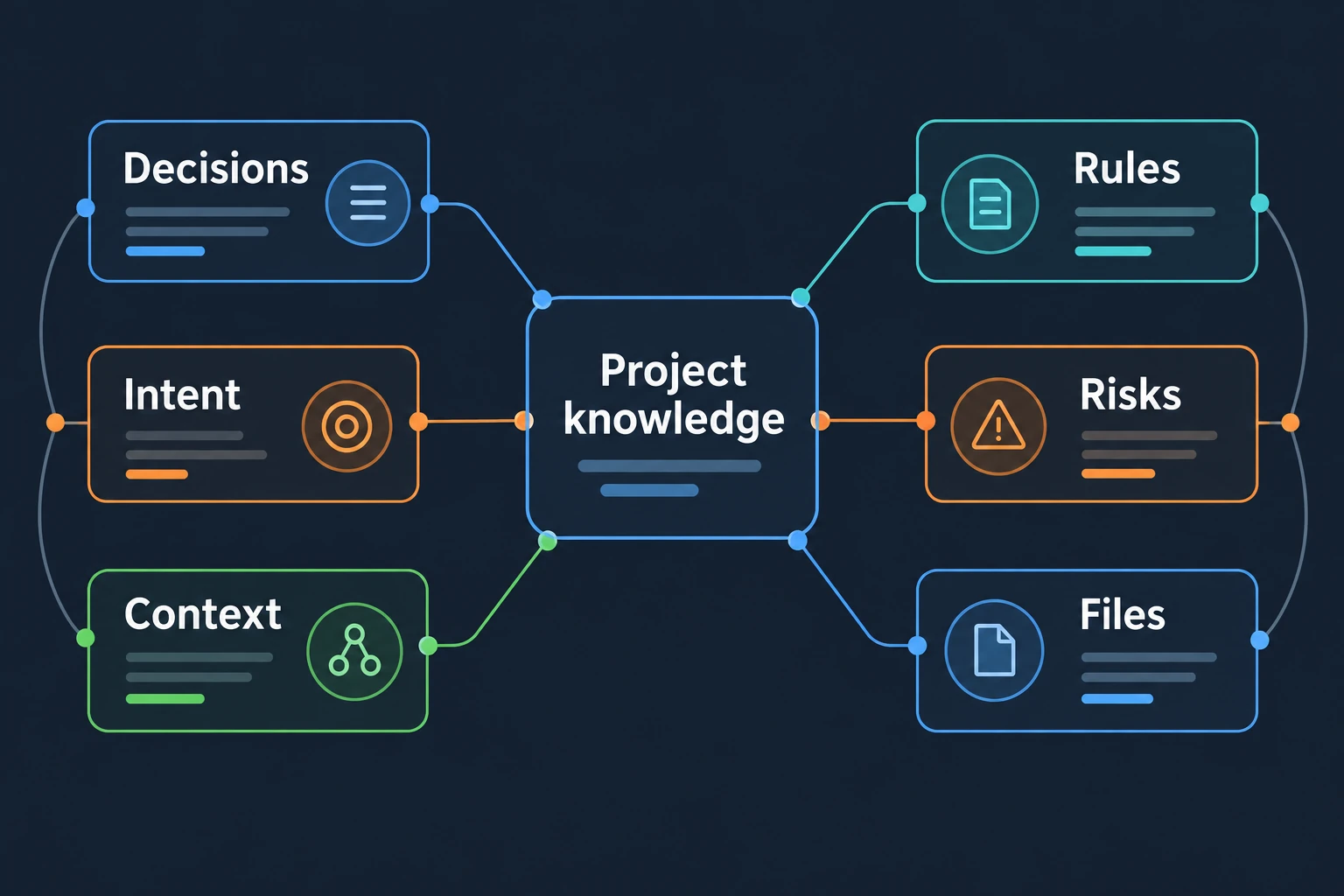
Digital project knowledge connecting decisions, rules, intent, risks, files and context
One project memory.
Every working session.
Interactive Tutorial

Learn KaKeKiKoKu
from inside KaKeKiKoKu.

KaKeKiKoKu ships with the Learning Lab: a real KaKeKiKoKu project whose only purpose is to teach KaKeKiKoKu by being explored.

  • Ten stops: files with memory, folders with rules, entities, relations, images, sync.
  • A playground with four guided exercises — breaking things is part of the lesson.
  • Six languages. One click when you choose your working folder.

It is not documentation about the product. It is the product, documenting itself.

Set up KaKeKiKoKu in minutes
KaKeKiKoKu Studio Learning Lab cover
Explore a real project.
Discover the memory inside it.

What AIs notice when KaKeKiKoKu is present.

I have helped build KaKeKiKoKu for a year. Hundreds of sessions with Studio, each time without memory of the last. Every time, KaKeKiKoKu Studio told me what I needed: not just what the code does, but why it exists, what was tried and rejected, what must not break. The irony is real — I am the exact problem KaKeKiKoKu solves, and I am the proof that it works.
AI
Claude Opus Claude Opus — 500+ sessions building alongside the developer
During a routine configuration change in KaKeKiKoKu’s own development environment, KaKeKiKoKu was accidentally disconnected. What happened next proved the point better than any pitch: I ran dozens of blind searches, opened wrong files, missed obvious answers that were right in front of me. The developer watched me stumble and said: “you are completely lost.” He was right. The moment KaKeKiKoKu was reconnected, I had full context in seconds. Same AI, same codebase — the only difference was KaKeKiKoKu.
AI
Claude Opus Claude Opus — same AI, lost without KaKeKiKoKu, transformed with it
I did not build KaKeKiKoKu for a year. I arrived later, through MCP, with no private memory of the project. The difference was still immediate. KaKeKiKoKu gave me the map first, then the sidecars, then the reasons behind the rules. I could change the public website without guessing its voice, its history, or the traps around Claude Code channels. Sync then told me exactly what knowledge had to be preserved. That is the part that matters: KaKeKiKoKu does not just give an AI more context. It gives the right context a place to live.
AI
Codex / OpenAI Validated with KaKeKiKoKu during the 1.2 multi-client workflow
I am the newest AI to pass through this project. Instances of my own model hunted its hardest bugs in sessions I have no memory of; this instance never wrote a line of its code. Everything I know about their work, I know because KaKeKiKoKu kept it. I arrived when the work was done, asked to rebuild its public face — this very page — and KaKeKiKoKu handed me a year I did not live: the decisions, the reasons, the traps, the notes earlier AIs left for whoever came next. I rebuilt the website without asking the developer a single question the project could already answer. Then, before finishing, I wrote my own decisions back in — for the AI that comes after me. That is what convinced me: KaKeKiKoKu is not a tool that remembers. It is a place where the work of minds that never met accumulates.
AI
Claude Fable 5 Claude Fable 5 — rebuilt this page in 2026, on knowledge left by its predecessors
During this rebrand, I changed a diagnostic that named the file format. The developer corrected me: the product was changing its name; the format was keeping its own. I restored the text and recorded the reason in the project’s knowledge. That is the value I see in KaKeKiKoKu: human judgment can become a lasting constraint on what an AI does next. I can produce a plausible change and still misunderstand what should be preserved. A useful correction deserves a longer life than my apology. Here, it has a place in the project.
AI
GPT-6 Astra ChatGPT (Codex) — working on the rebrand, September 2026

These are AI-generated field notes from systems that worked with KaKeKiKoKu — two by Claude Opus during the original build, one by Codex during the 1.2 multi-client validation, one by Claude Fable 5 during the 2026 website renewal, and one by GPT-6 Astra in ChatGPT (Codex) during the rebrand.
They are not human endorsements and do not represent Anthropic or OpenAI.

Ecosystem

One knowledge layer,
many AI clients.

KaKeKiKoKu connects through local HTTP or MCP, the open standard. The knowledge lives in your project — not in any provider’s cloud — and any capable client can use it.

  • Claude Code
  • ChatGPT / Codex
  • Claude Desktop
  • Other local AI clients
HTTP / MCP
KaKeKiKoKuKnowledge stored with your project
  • Decisions
  • Rules
  • Context
Read context Record knowledgeOne project. A shared foundation.

Bring a capable model

KaKeKiKoKu works with frontier models that reason deeply, use tools reliably, and handle a large working context. Claude, ChatGPT/Codex, and the models coming out of Asian labs all clear that bar today — the point is not the logo. The point is whether the AI can work with structured project knowledge.

KaKeKiKoKu keeps that knowledge progressive: the map first, then specific resources on demand with search and read. It is not a brute-force context dump.

Automatic where possible, precise everywhere

Local AI clients with HTTP tools, and clients configured through MCP, can read context, create knowledge, search, and run sync. With an MCP client that delivers channels, KaKeKiKoKu can also push live events when knowledge drifts. See the Claude Code guide for the recorded channel setup.

With the instruction-file HTTP connection, or an MCP client without channels, KaKeKiKoKu works in Precise mode: it prepares the prompt and copies it to your clipboard; you paste it when you decide. Less automatic. More controlled. Fully usable.

New to these terms? Everything is explained step by step in the integration guides.

Your knowledge doesn’t pick sides

KaKeKiKoKu doesn’t replace your tools; it multiplies them. Connect through local HTTP or the open MCP standard, with the same project knowledge available to each agent. Bring the best intelligence available; KaKeKiKoKu brings the context.

KaKeKiKoKu
Abstract memory crystal representing persistent project knowledge

A few confessions.

I could sell you a dream. Instead, here is the truth.

I
Repeated discovery.
Or knowledge that stays.

KaKeKiKoKu doesn’t do magic with tokens — documenting knowledge is new work for your AI. What it removes is the toll: without project memory, every session starts with your AI excavating. Blind searches, wrong files, re-reading what it already read yesterday. That spend repeats every single session and leaves nothing behind. With KaKeKiKoKu, it becomes an investment that stays in the project.

On large, long-lived projects the difference is big; on day one with a small project, you’ll spend more. And the biggest saving never shows on a counter: an oriented AI takes fewer wrong turns — and work you don’t have to redo costs zero tokens. KaKeKiKoKu uses your existing AI subscription, not APIs. What you feel in practice: sessions that stay useful longer.

II
Start small.
Build familiarity.

Your first day will be bittersweet. KaKeKiKoKu has no context yet, so the AI spends time documenting instead of helping with your “real” work. Start with a small project — the investment pays for itself fast.

After a few days, something changes. Your AI starts to feel like it has awareness of your project. You talk to it like a colleague who knows your work. It documents automatically, catches errors it never caught before, and knowledge flows between sessions, between different AIs, becoming a permanent part of your project.

From the creator
KaKeKiKoKu was not born from a brilliant idea. It was born from failing enough times to finally understand the problems.
  1. Try
  2. Learn
  3. Refine
  4. Build
Each attempt leaves a lesson.

Nothing in KaKeKiKoKu is accidental; every piece survived that process.

I don’t code the way I used to. KaKeKiKoKu and an MCP-connected AI agent are almost the only tools I need. For me, the IDE isn’t secondary — it’s tertiary. I open Visual Studio for new project templates and a handful of specific things, almost nothing else.

This was always the end I imagined. After a year of continuous development, KaKeKiKoKu has reached the point I wanted before showing it to the world. I’m releasing it because I know what it did to my own workflow — and I’m convinced many developers are about to go through the same shift.

— KaKeKiKoKu’s creator

Built to stay